FerryFriend
- 4.7
- Rating
- 10.00K
- Installs
- Free
- Price

 Analysis by App-foxy
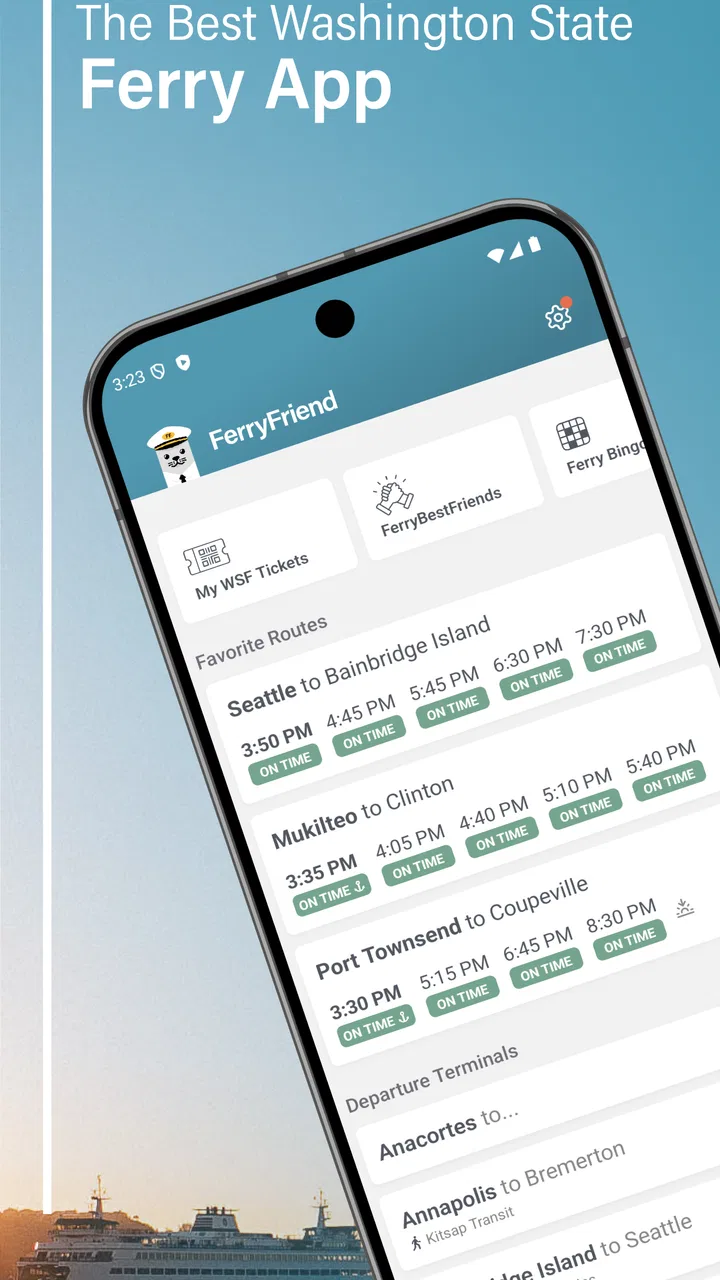
When I am planning a trip around Puget Sound, the hardest part is often not choosing a destination but working out which ferry I can actually catch. FerryFriend is a travel and local app from True Course LLC that focuses on Washington ferry schedules. I found its appeal in that narrow purpose: instead of treating ferry travel as a small detail inside a broad map or travel app, it puts the timetable question at the center.
That focus makes it easier to judge. This is not an all-purpose trip planner, a general navigation replacement, or a social travel guide. It is designed for the moment when I need to understand ferry departures and organize the rest of a journey around them. The app is free to install, rated for Everyone, and has reached more than ten thousand installs. Its current version is 5.6.1, and it runs on Android 7.0 or later.
My overall impression is positive, especially for regular ferry travelers and visitors who want a dedicated schedule tool rather than a crowded travel dashboard. At the same time, the app’s usefulness depends heavily on how closely my needs match its purpose. If I want complete door-to-door routing, live traffic guidance, hotel booking, or a broad sightseeing planner, I would still use other tools alongside it.
You May Also Like

 Pandora - Music & Podcasts
Pandora’s Music Is Easy to Start, but Harder to Recover
Pandora’s strength is its low-effort path from a seed to a station. Its weak spot is how much confidence it asks you to place in connection, setup, and quiet recovery.

 8 Ball Pool
8 Ball Pool Is Built on Rivalries, Rematches, and Routine
A close look at the rivalries, rematches, shared routines, and unanswered safety questions that turn a quick pool match into a persistent mobile community.

 Samsung Music
Samsung Music’s Quiet Strength Is Playing What You Already Own
Its reach comes less from spectacle than from dependable access to a personal library. That simplicity is both the app’s strongest retention engine and its ceiling.

 AccuWeather: Weather Radar
AccuWeather Review: A Quick, Clear Forecast for Everyday Decisions
For everyday plans, the best forecast is the one you can understand quickly. AccuWeather makes rain timing, radar, and local conditions easy to act on, with a few trade-offs.

 Hill Climb Racing
Why Hill Climb Racing Still Turns Crashes Into One More Run
A tiny car, a bumpy hill and one more upgrade: Hill Climb Racing keeps resurfacing because its simple chaos makes every near-miss feel personal.

 AliExpress - Shopping App
AliExpress Makes Global Shopping Feel Personal, but Shoppers Bear the Risk
AliExpress turns a global marketplace into a pocket-sized discovery engine. Its reach is useful, its shopping loop compelling, and its trade-offs easy to miss.
More From Our News Desk
View All News


How FerryFriend fits into a real ferry trip
The most practical way to use the app is before leaving home, while I am deciding whether a ferry departure fits the rest of my day. I can check the relevant schedule, compare possible sailing times, and then decide when to leave for the terminal. That order matters. Many general map apps begin with a driving route and treat the ferry as one part of a larger calculation. A dedicated schedule app encourages the opposite approach: choose a workable sailing first, then build the road journey around it.
That is particularly useful when a ferry is the part of the trip that cannot be casually replaced. Missing a turn on the road may cost a few minutes; missing the sailing I planned around can change the whole day. FerryFriend’s narrow scope is therefore also its main strength. It gives the schedule question its own place instead of burying it among unrelated travel information.
I would use it in several different situations. A commuter could check a familiar route before leaving work. A weekend traveler could compare an earlier and later departure before committing to a restaurant or activity. Someone visiting Washington for the first time could use the app to understand the rhythm of a ferry-based itinerary before opening a maps app for driving directions.
One useful habit is to check the schedule at two separate points: once while making the plan and again shortly before leaving. The first check helps me choose a realistic itinerary. The second keeps the schedule fresh in my mind and gives me a chance to notice anything that affects my timing. I would still allow extra time for the terminal and road conditions rather than treating the displayed departure as a guaranteed personal appointment.
That distinction is important. A schedule app helps answer when a sailing is planned, but it does not turn the entire journey into a controlled process. I still need to think about traffic, terminal access, parking, queues, loading procedures, and the possibility that conditions may change. The app is most valuable as a planning anchor, not as permission to arrive at the last possible minute.
What the free access means for value
FerryFriend is free to download, which makes trying it straightforward. I can install it, see whether its schedule presentation suits my route, and decide whether it belongs in my regular travel routine without paying at the door. For an occasional visitor, that low commitment is a real advantage: the app only needs to be useful during the trip rather than becoming a permanent subscription decision.
There are in-app purchases ranging from $2.99 to $599.99 per item. Because those purchases cover a very broad range, I would not assume that every traveler needs to buy anything. The sensible approach is to start with the free access, identify which parts of the experience are already useful, and inspect each purchase carefully before spending money. A low-cost optional purchase may be reasonable for a frequent user, while a much larger purchase deserves a completely different level of scrutiny.
This is where the app’s value needs to be separated into two questions. The first is whether the free experience solves the basic schedule problem. The second is whether any paid option adds enough convenience or capability for a person who uses the app often. I would not judge the entire app by the existence of in-app purchases, and I would not treat a purchase as automatically worthwhile simply because it is available.
For me, the free entry point is the strongest part of the cost proposition. It lets a traveler test the workflow against a real ferry plan rather than relying on a description. If the app makes it quicker to answer the schedule question, it may already earn a place on the phone without further spending. If it does not fit my route or habits, I can move on without having paid just to find out.
Where the app delivers more than a general map
A general maps app is excellent when I need driving directions, estimated road time, nearby places, and an overview of the whole route. It is less satisfying when the key decision is simply which ferry departure makes the day workable. FerryFriend’s advantage is concentration. It is easier to think about a sailing as the central event when the app is built around Washington ferry schedules rather than trying to balance every possible travel layer at once.
That can reduce mental clutter. Instead of repeatedly adjusting a broad route because the ferry timing does not suit me, I can first inspect the sailing options and then return to navigation. This two-app workflow may sound less convenient than an all-in-one solution, but in practice it can be clearer. One tool handles the timetable decision; another handles the road portion.
The app also makes sense beside official information rather than necessarily replacing it. I would use FerryFriend for quick planning and routine checks, then consult the most current official source when the trip is especially important or when timing changes could have serious consequences. That is not a criticism unique to this app; it is a sensible division of labor for any schedule-focused travel tool.
A less obvious benefit is that it can help me notice unrealistic plans before I leave. If I am trying to fit a ferry crossing between two fixed appointments, seeing the available departures in one focused place may reveal that the plan has no comfortable margin. That is better than discovering the problem halfway through a drive. The app’s value is therefore not only finding a departure; it is helping me reject a bad itinerary early.
Tradeoffs I noticed while judging the workflow
The focused design also creates limits. FerryFriend is not the app I would open first for a complete trip from my front door to a final destination. I would still need another tool for road navigation and probably another source for broader travel details. Anyone expecting one screen to combine ferry schedules, traffic, walking directions, attractions, and reservations may find the experience incomplete.
There is also a planning risk when a traveler treats a schedule as the whole story. A departure time does not tell me how long it will take to reach the terminal, how easy parking will be, or how much buffer I should allow. I would use the app to organize the timetable portion, but I would not use it as a substitute for judgment. The best workflow is to pair the schedule with a realistic road estimate and extra time.
Another tradeoff concerns occasional versus frequent use. A visitor making one ferry trip may appreciate the free access but have little reason to explore paid options. A commuter or regular traveler may find more value in any convenience-oriented purchase, yet that person should still compare the cost with how often the app actually saves time. A feature that feels useful every day can justify attention; a feature used once on a holiday may not.
The broad in-app purchase range makes that evaluation especially important. I would read the purchase screen slowly, confirm what is included, and avoid assuming that the highest-priced option is intended for an ordinary individual traveler. The presence of a large upper price does not by itself tell me what I need. The right decision depends on the actual benefit offered and my own frequency of use.
I would also avoid relying on any schedule app as my only source during a high-stakes journey. If I had a flight, medical appointment, event ticket, or strict check-in time waiting on the other side, I would build in more margin and verify the latest relevant information before departure. FerryFriend can improve planning, but no timetable interface removes the need for contingency thinking.
Small habits that make it more useful
My first tip is to plan backward from the appointment or activity that cannot move. Choose a ferry that leaves room for the crossing, arrival, and the next part of the journey instead of selecting the latest possible sailing. This turns the app from a departure lookup tool into a way to test whether the whole day is realistic.
My second tip is to compare at least two possible departures when the day allows it. The earlier option may offer a safer buffer, while the later one may reduce waiting at the terminal. Looking at both makes the tradeoff visible before I am on the road. It also helps when another traveler asks whether leaving later is genuinely practical.
My third tip is to separate schedule confidence from arrival confidence. I may feel confident about the listed sailing time while still being uncertain about traffic or terminal access. I would write down the departure I am targeting, then use a navigation app to calculate when to leave and add personal buffer. That simple separation prevents the common mistake of confusing a clear timetable with a guaranteed arrival.
A fourth useful workflow is to use the app during group planning. When several people are debating lunch, parking, or a return trip, the ferry schedule becomes the fixed reference point. I can settle the departure first and then choose flexible activities around it. This is more efficient than letting every part of the itinerary remain vague until the last minute.
Finally, I would test the app on a normal trip before depending on it for an important one. A routine crossing gives me a chance to learn how quickly I can find the route and how well the presentation matches my expectations. Once that process feels familiar, the app becomes more useful under travel pressure because I am not learning the interface while rushing to a terminal.
Who will get the most from it
FerryFriend is a strong fit for people who regularly travel through Washington by ferry and want schedules close at hand. It is also a sensible companion for visitors who have already decided that a ferry crossing is part of their trip. The free access lowers the barrier for both groups, while the dedicated focus keeps the main task easy to understand.
It may be especially helpful for travelers who dislike switching between a browser, a map, and a timetable page. Even if the app does not replace every other tool, having a schedule-focused option ready can make the planning process feel less scattered. I can see it being useful for families too, because deciding on a departure early makes meals, arrival times, and return plans easier to coordinate.
People who should skip it are those who rarely need Washington ferry schedules and already have a workflow that works perfectly. If my trips are entirely local, if I only need walking directions, or if I expect a full travel concierge, this app is unlikely to become essential. The same is true for anyone uncomfortable with checking purchase details before using optional paid features.
The rating is a 4.7 average from around 33 ratings, with 11 written reviews, which suggests that the app has been received warmly by the people who have rated it. I treat that as encouraging rather than conclusive. The audience is still specialized, so my own route and expectations matter more than the number alone. Its audience size, at over ten thousand installs, also fits the picture of a focused utility rather than a universal travel platform.
My buy-or-skip verdict
I would recommend installing FerryFriend if Washington ferry schedules are part of a coming trip or a recurring commute. The free starting point makes the decision easy, and the app’s narrow purpose can save time when the ferry is the part of the itinerary that determines everything else. I would use it alongside a navigation app, not instead of one, and I would keep a sensible buffer for the realities of terminal travel.
I would skip it if I want a complete travel planner in one place or if I have no practical reason to check Washington ferry schedules. I would also avoid purchasing anything immediately. First I would confirm that the free experience fits my route, then decide whether a paid option offers a benefit I will use often enough to justify its cost. The range from $2.99 to $599.99 means careful attention is worthwhile.
In the end, I like FerryFriend because it understands a specific travel problem and gives that problem room to breathe. It does not need to replace maps, official updates, or common sense to be useful. For the right traveler, the best value is the combination of a free starting point and a focused schedule workflow. If that is exactly what I need, I would keep it installed; if I need a broader travel toolkit, I would choose a more comprehensive companion instead.
FAQs for FerryFriend
01What is FerryFriend and what can I use it for?
FerryFriend is designed to help travelers plan and manage ferry journeys in one place. Depending on the routes and operators supported in your region, you can use it to explore crossings, check schedules, compare available options, review journey details, and organize travel information. It is especially useful when you want a clearer overview before booking, although availability and features may vary by destination.
02Can I book and pay for ferry tickets directly through FerryFriend?
FerryFriend may provide access to ferry booking information or connect you with supported operators, but the exact booking and payment process depends on the route and ferry company. Some journeys may be bookable inside the app, while others can redirect you to an external website. Before paying, check the final price, passenger details, vehicle requirements, and the operator’s cancellation terms.
03Does FerryFriend show live ferry schedules, delays, or cancellations?
The app can be useful for checking scheduled departure and arrival times, but users should not assume that every timetable is updated instantly. Live status information depends on the ferry operator and the data available for each route. For important trips, particularly during bad weather or busy periods, confirm the latest departure information with the operator or terminal before leaving.
04Is FerryFriend available for all ferry routes and destinations?
FerryFriend does not necessarily cover every ferry company, port, or international route. Its usefulness depends on the destinations and operators included in the service, so coverage should be checked before relying on it for a specific journey. Search for your departure and arrival ports in the app, and compare the displayed results with the official ferry company if your route is not listed.
05What information or permissions does FerryFriend require?
The information requested by FerryFriend can vary according to the features you use. Travel searches may require route, date, passenger, or vehicle details, while optional location access could help identify nearby ports or provide more relevant results. Review the app’s privacy policy and permission prompts carefully, and avoid granting access that is not necessary for the planning features you intend to use.
Pros
- Shows ferry routes
- schedules
- and operators in one convenient place.
- Useful for comparing travel options before planning a crossing.
- Can help identify alternative sailings when preferred times sell out.
- Clear trip details make it easier to check departure and arrival times.
- Helpful for travelers unfamiliar with local ferry services.
Cons
- Coverage may vary considerably depending on the country or ferry operator.
- Schedules can change
- so confirm details directly with the operator.
- Some routes may require booking through an external website.
- Availability and prices may not update instantly during busy periods.
- A stable internet connection may be needed for reliable trip searches.

FerryFriend
Gallery